
How do I create a plan in Subscription Billing?
In the Subscription Billing section, you'll find buttons to Create a new recurring charge and Upload Excel to upload a list of recurring charges.
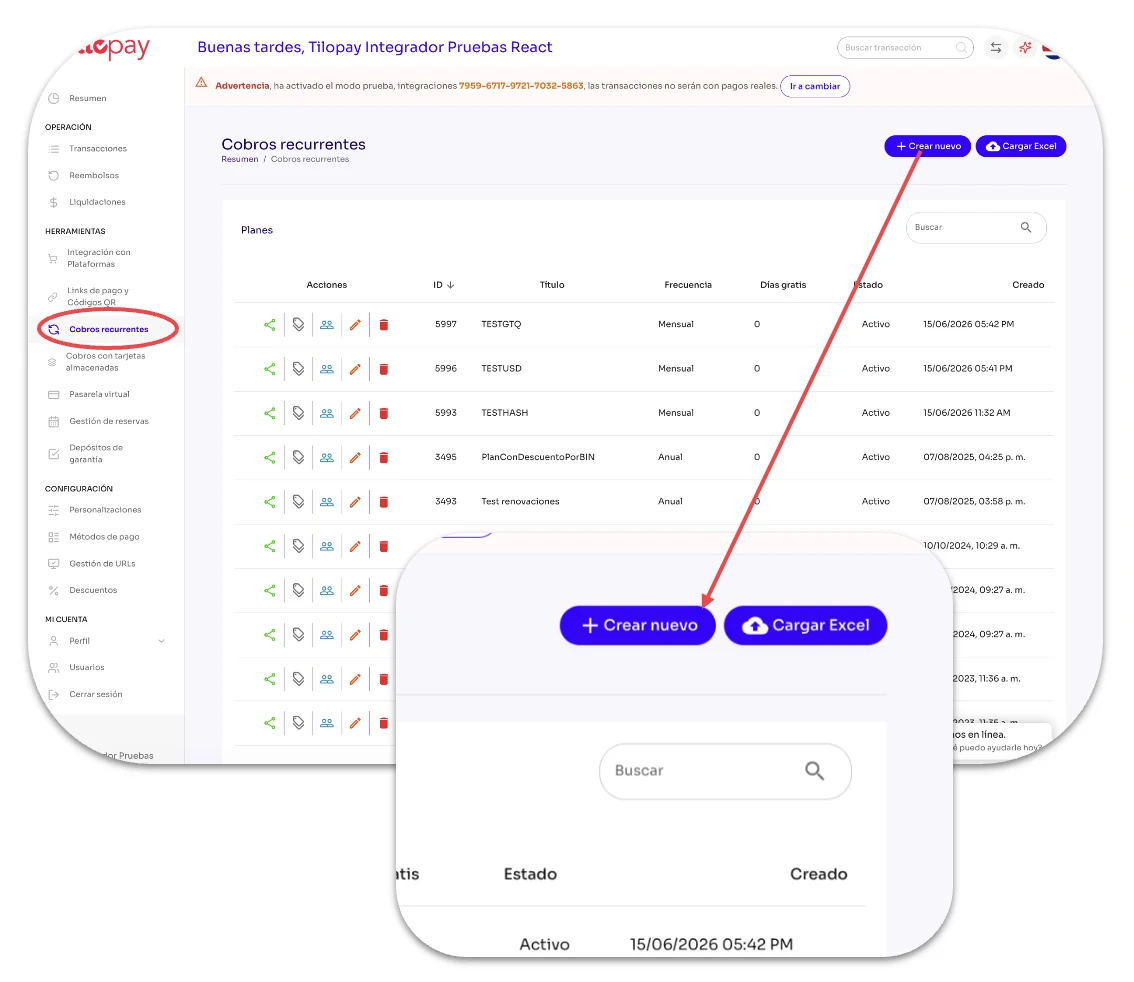
In the Subscription Billing section, you'll find buttons to Create a new recurring charge and Upload Excel to upload a list of recurring charges.
If you include your subscribers' email addresses in the Excel file, the Tilopay Admin Dashboard will email them a subscription notification.
| Form field | Explanation | Required field |
|---|---|---|
| Title | Enter the name or title you want to give this recurring billing plan. | Yes |
| Plan description | You can enter the plan details so your customers know what it includes. | |
| Frequency | Specify how often the subscriber's card will be charged. If you don't select an option, the frequency will be Daily. | Yes |
| Currency | Select the currency you want to charge based on what you've configured in your payment methods. | Yes |
| Initial payment amount | If you want to charge an initial amount to customers who purchase this plan, enable it here. If you leave it at zero (0), your customer won't be charged anything. | |
| Failed payment attempts per day | Choose how many times per day Tilopay can attempt to charge your customer if a payment fails. If you don't select a number, Tilopay will only attempt to charge your customer once (1) per day. | |
| Recurring Charge Amount | Enter the amount you'll charge your customer. | |
| Amount | Specify the amount you'll charge customers who choose this plan based on the frequency you selected. | Yes |
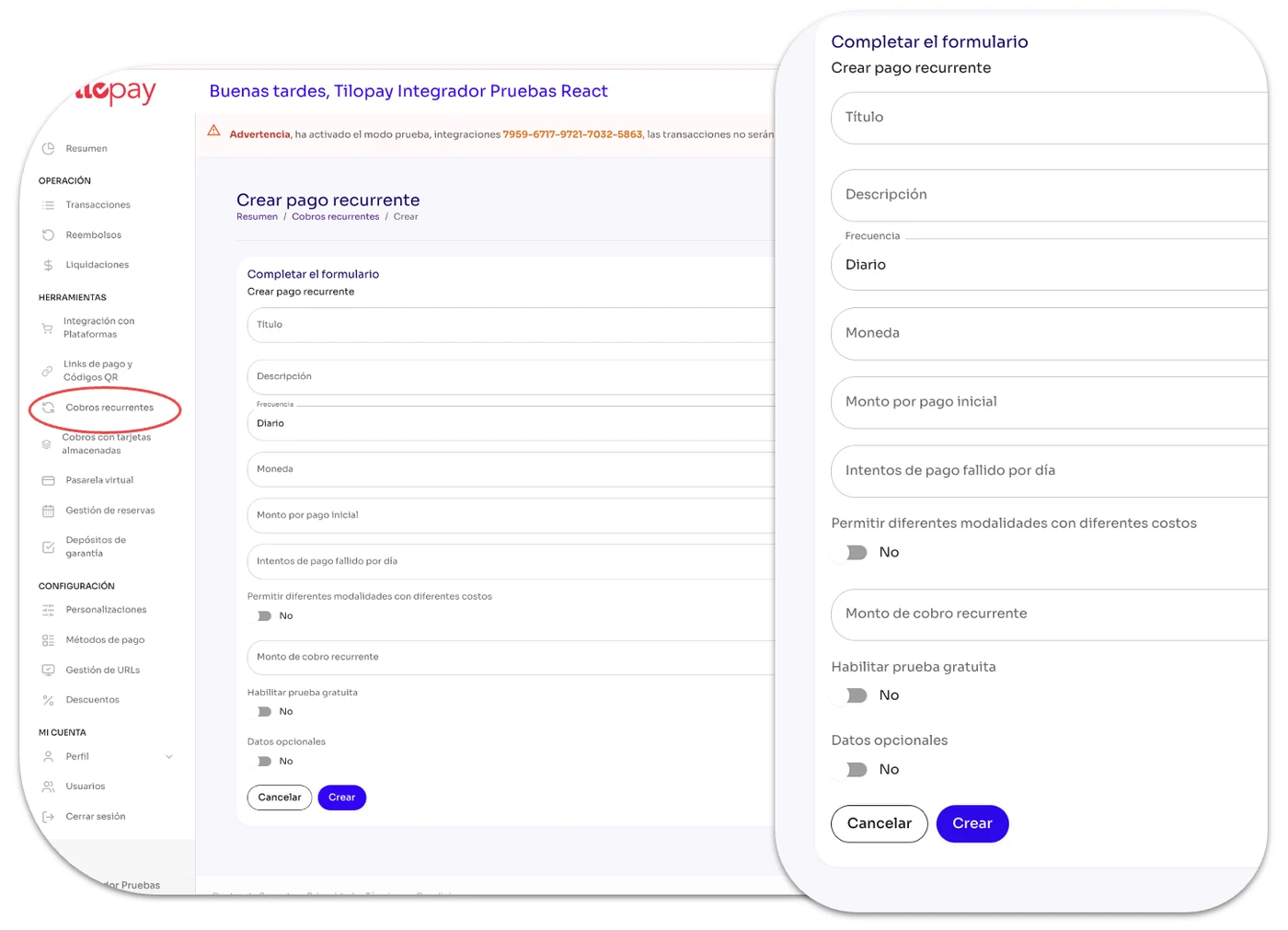
| Form field | Explanation | Required field |
|---|---|---|
| 1. Allow different options with different prices | You can add several options for your customers to choose from. Each option will have its own name and amount. | Yes |
| 2. Enable free trial | Enable this option and specify how many days customers can enjoy a free trial. | Yes |
a
b
c
| Form field | Explanation | Required field |
|---|---|---|
| 3. Optional information | You can add several options for your customers to choose from. Each option will have its own name and amount. | |
| a. Number of allowed renewals | Enable this option and specify how many days customers can enjoy a free trial. | Yes |
| b. End date | This lets you set the date when recurring billing ends. If you leave it blank, there will be no end date. |
c
| Form field | Explanation | Required field |
|---|---|---|
| c. Redirect URL when canceling the process (GET method) | ||
| Thank-you URL | Use this if you want to send the customer to a custom URL thanking them for subscribing. | |
| Redirect URL when canceling the process | Use this if you want to send the customer to a redirect URL when they cancel their subscription. | |
| Form field | Explanation | Example |
|---|---|---|
| d. Webhook URL (POST method) — Optional fields | ||
| Successful registration webhook URL | Here you can enter a webhook URL to receive the callback when a customer successfully purchases a subscription. | {'id_plan' : 1, 'email' : 'email@email.com', 'modality' : 'ModalityName', 'amount' : 25, 'frequency' : '', 'coupon' : '5HT5W8YT', 'free_trial' : 1, 'next_payment_date' : '2023-02-25'} |
| Redirect URL when canceling the process | Here you can enter a webhook URL to receive the callback when the customer is charged successfully. | {'id_plan' : 1, 'email' : 'email@email.com', 'amount' : 25, 'auth' : '123456', 'orderNumber' : 'PRE123456'} |
| Declined payment webhook URL | Here you can enter a webhook URL to receive the callback when a payment fails. | {'id_plan' : 1, 'email' : 'email@email.com', 'amount' : 25} |
| Subscription cancellation webhook URL | Enter a webhook URL to receive the callback when a customer cancels a subscription to one of their purchased plans. | {'id_plan' : 1, 'email' : 'email@email.com', 'expire' : '2023-02-25'} |
| Subscription reactivation webhook URL | Here you can enter a webhook URL to receive the callback when a customer reactivates a subscription to one of their plans. | {'id_plan' : 1, 'email' : 'email@email.com', 'next_payment_date' : '2023-02-25'} |
d