
How do I refund a transaction?
To issue a refund, find the transaction you need to refund using any of its transaction details.
To issue a Refund, find the transaction you need to refund using any of its transaction details.
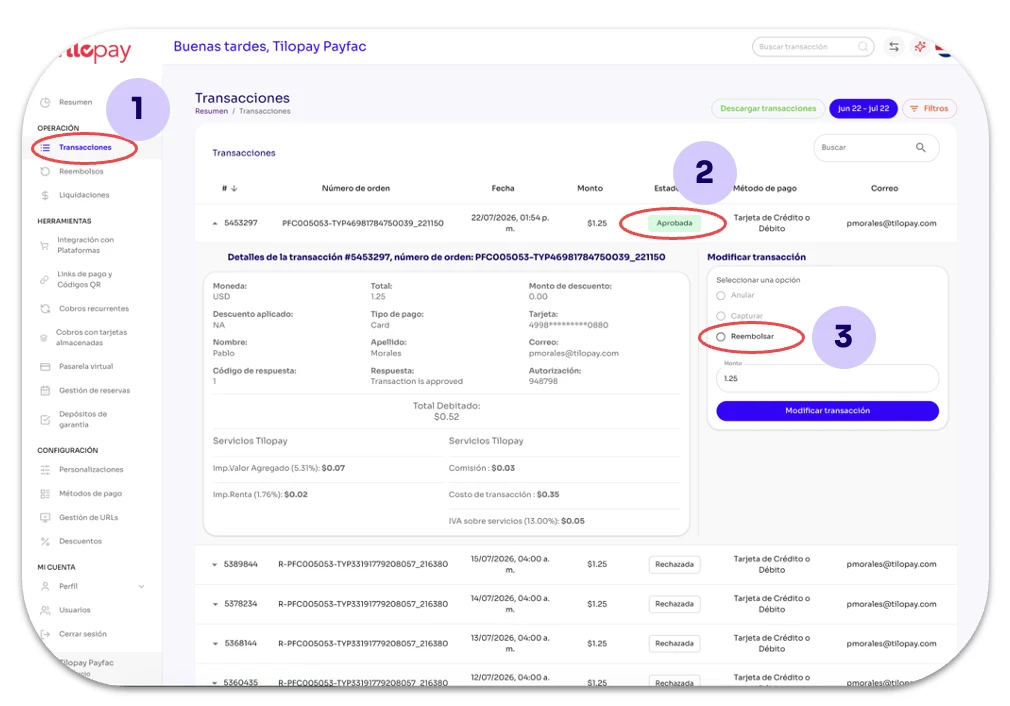
Use the search button in the upper-left corner or go to the Transactions (1) module.
The transaction must have an Approved (2) status before you can refund it.
Click the transaction and select Refund (3) in the Modify Transaction section.
This option lets you change the refund amount if you need to issue a Partial Refund.
Then click the Modify Transaction button to change its status.
Once you complete the Refund, you'll see a success message.
You can confirm the Refund in the same table, as the transaction status will update immediately.
You can also search for the transaction in the Refunds section by order number, refunded amount, or transaction #ID.
[image 23]