
How do I integrate Tilopay with Magento or Adobe Commerce Cloud?
To set up the Tilopay extension in Magento 2 and Adobe Commerce Cloud, download the extension available in your Dashboard.
To set up the Tilopay extension in Magento 2 and Adobe Commerce Cloud, download the extension available in the Tilopay Admin Dashboard.
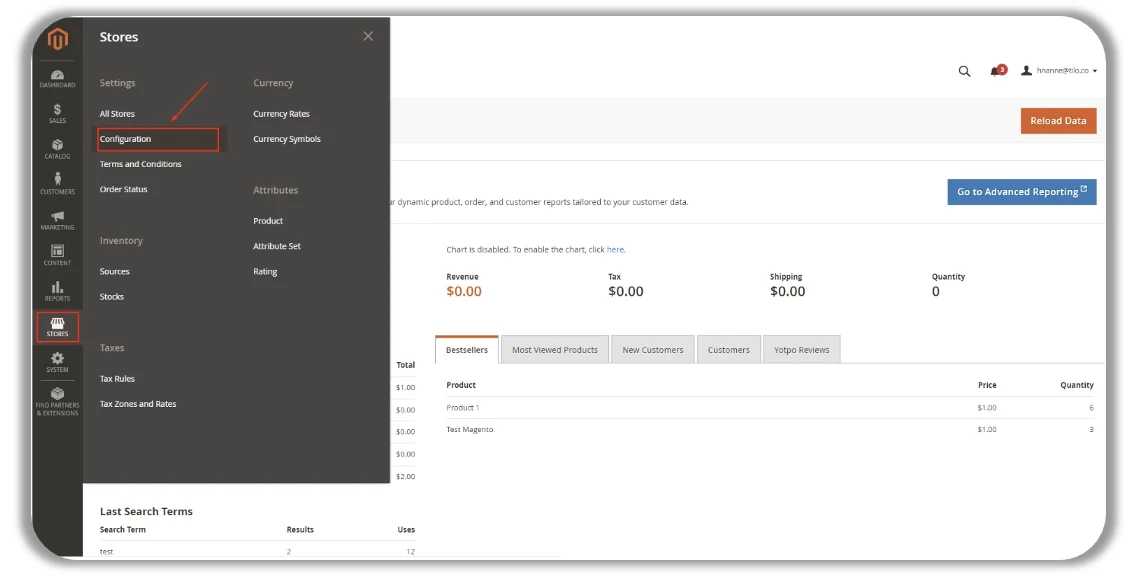
Log in to your Magento or Adobe Commerce Cloud merchant account (dominio.com/admin) and go to the store configuration section (Main Menu -> Stores -> Configuration).
Go to Sales -> Payment Methods -> Tilopay and complete the following fields to continue with the setup:
Enabled: Select Yes.
Title: Enter the text you want customers to see when they select this payment method.
You can find your Tilopay credentials for integrating with WIX in the Tilopay Admin Dashboard. Click Platform Integrations and find WIX in the drop-down list.
Debug: Select No unless you need details for each process in the Magento log.
Payment Action: Choose between:
Authorize and Capture to enable two-step transaction capture: once the transaction is authorized, you must capture it manually (see the next section).
Authorize to capture transactions automatically.
[image 30]
[table 31]